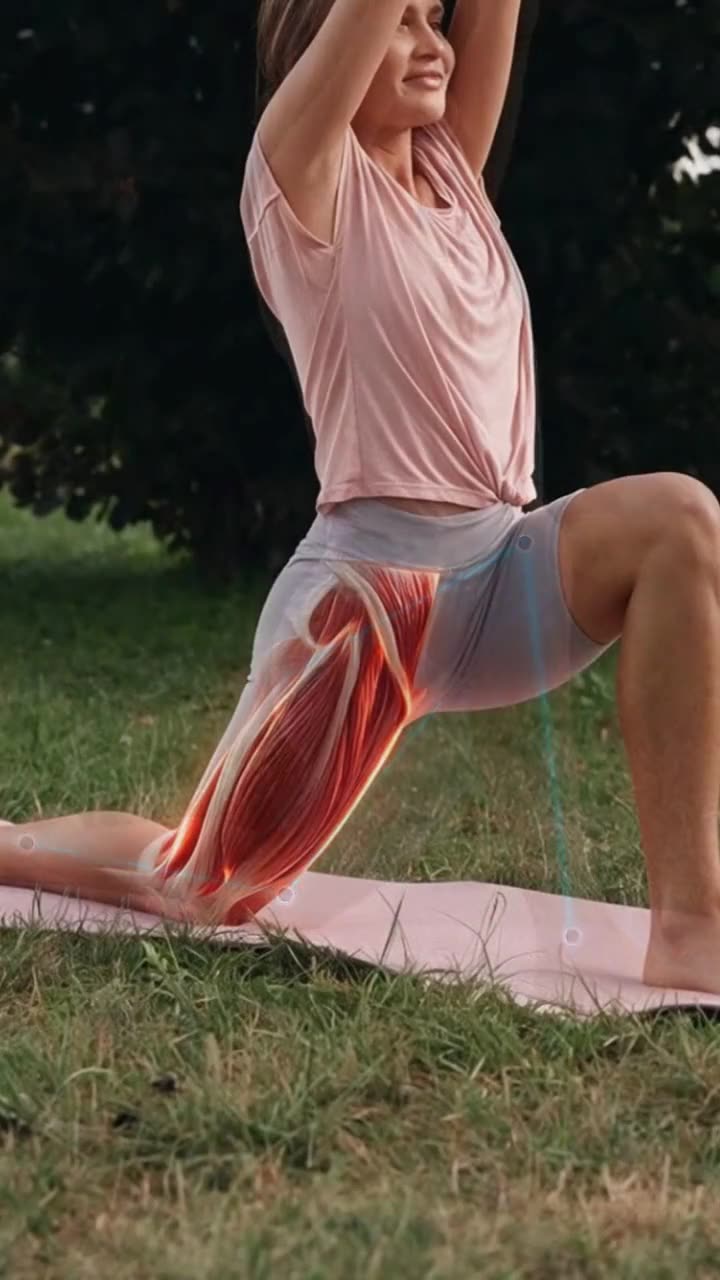
The exercise is clear in the clinic. At home, it isn’t.
Say a patient is coming back from a knee injury. You show them a split squat: how far down, the knee over the middle of the foot, slow on the way down. They nod. Three days later they do it fast, too deep, with the knee falling inwards.
A sheet of stick drawings can’t show the timing, the depth or the one thing to watch. A raw clip shows the movement but doesn’t point at what matters. To do that, someone has to slow the key moment down, mark the knee and put your cue where it belongs. That’s an editor’s job, and you see patients all day.
Clipteach makes that edit from a clip you film in a minute, between two patients.
Two ways in: your exercise clips, or the body explained in 3D
Most patients need both: how to do the exercise, and why it helps.
| Edit: your exercise clips | Create: a 3D Body explainer | |
|---|---|---|
| You bring | Clips from your phone: you or a colleague doing the exercise | A script, your notes, a PDF or a voice recording |
| On screen | The real exercise, with the joint tracked, its angle shown live and the key moment slowed down | A 3D human body: the muscle you name lights up, the joint moves, the camera dives in |
| The voice | Your own words from the clip, or a narration built on your cues | A pro voice, or your own recording |
| Best for | Home exercise programs: form, depth, tempo, the common mistake | The why: what a muscle does, why this exercise, what to feel |
Edit: from a phone clip to an exercise video
Upload what you filmed. The video points at what you would point at.
- Body tracking: marks pinned to the joints and the angle shown live, a ring on the knee with its degrees changing as it bends.
- Replays & slow motion: the moment that matters, shown again slowly, like the bottom of a squat or the turn of a shoulder.
- Camera moves: a push in on the joint when your cue names it.
- Cut silent moments and Keep the best takes tidy up a clip you filmed in one go.
- Choose My video and upload your clips: MP4, MOV or WebM, up to 5 GB each. Keep the whole body in the frame and the phone still.
- Choose the voice. Keep my voice if you explain while you demonstrate. AI narrates if the clip is silent: put the cues you always give in Script & notes and the narration builds on them.
- Pick the style. Interface draws clean tracking marks and graphics over your clip. 3D Body, with AI narrates, freezes the key moment and paints the working muscles on the person.
- Click Generate. The price is shown first, based on the final video’s length, and no credits are used before that.
Your method, your words
Clipteach doesn’t choose the exercise, the dose or who it is for. You do. The video shows what you filmed and says what you tell it: your cues in Script & notes, or your own voice.
For a 3D explainer, write it the way you’d say it to a patient and switch Rewrite off: your script is read exactly as written, and the 3D Body style shows it inside the body.
Watch every video before you send it. In the studio you can trim it, change any scene or ask for a change in plain words.
Film yourself or a colleague doing the exercise. If you film a patient, ask for their written consent first.
Send it to a patient, or post it
Export a 1080p MP4: vertical 9:16 for a patient’s phone, Reels and Shorts, or wide 16:9 for your website, a course or a screen in the waiting room.
On Creator and Studio, a brand kit (logo, colours, font) puts your clinic’s look on every video.
The same clips work for coaching too: videos for fitness coaches.
What it costs to try
Sign up and get 300 free credits, enough for a short video. No card.
A video made from your clips is priced on the final video’s length, and the price is shown before you click Generate.
Plans: Starter $19 a month ($190 a year), Creator $49 ($490 a year), Studio $149 ($1,490 a year). Credits roll over and never expire.