How to make an explainer video from a script, a PDF or your voice
How to turn text into a video, step by step: make an explainer video from a script, a PDF, a slide deck or a voice recording, and steer every scene.
October 25, 2026 · 7 min readFor teachers, coaches, marketers, creators
Paste a script, import a PDF, Word file or slide deck, or upload a recording of your voice. An AI director plans every scene and times it to the word, in 3D Body, Doodle or Motion.
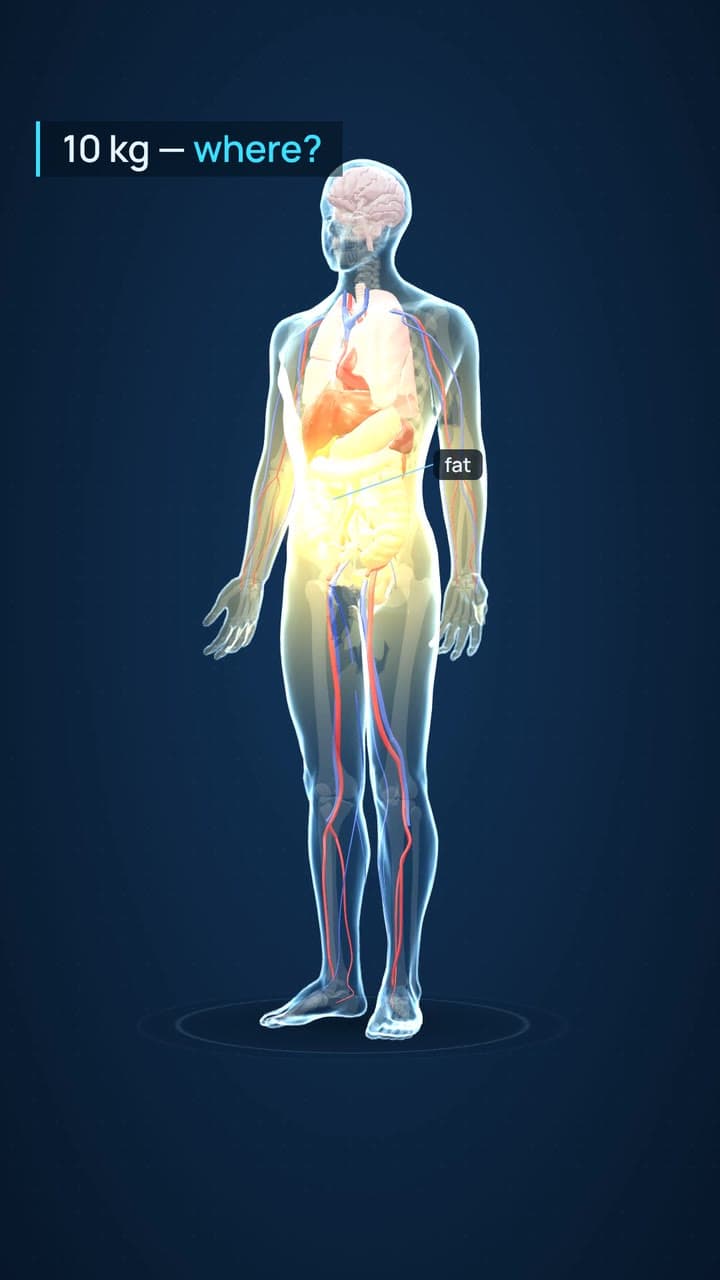
[The whole see-through 3D body, the camera turning slowly round it. A warm yellow glow spreads over the belly, with a label: "fat".]
Lose ten kilos of fat. Where does it all go?
[Yellow drops leave the belly and travel through the blood, up to the heart.]
Your body breaks it down, and your blood carries it away.
[The camera dives to the lungs. They light up, and drops stream up the windpipe and out of the mouth.]
And most of it leaves your body through your lungs.
[A big number counts up: "8.4", with the words "kg breathed out".]
Eight point four kilos, breathed out as carbon dioxide.
[The camera turns round behind the body. Light-blue drops run from the kidneys down to the bladder, which fills. A label: "water".]
The other one point six kilos turn into water, and leave the way water does.
[Back to the whole body, from the front. The lungs glow with each breath out.]
Fat doesn't just vanish. You breathe most of it out.
How it works
A script or your notes, a PDF, a Word file, a PowerPoint or Google Slides deck, or a recording of your own voice.
3D Body, Doodle or Motion, and a pro voice. Rewrite on writes the narration; off, your words are read as written and [notes] direct the scenes.
Every scene is planned and timed to the word it belongs to. Change any scene in the studio, then export a 1080p MP4.
What you get
A script, your notes, an article. With Rewrite on, it becomes a narration; with it off, it’s read word for word.
A PDF up to 50 MB, Word, PowerPoint or a Google Slides link. A deck’s speaker notes become the voice.
Your own voice is the narration. It’s transcribed, and every scene lands on the word it belongs to.
It picks what appears, where, how it moves and which word it lands on, scene by scene.
Trim, split and pace on the timeline, or ask the assistant in plain words and approve its plan.
Download an MP4: wide for a course or YouTube, vertical for Reels, Shorts and TikTok.
Animation styles
A real 3D body, whiteboard drawings, animated charts, motion graphics: each style has its own motion, layouts and artwork, not just its own colours.
Pricing
Minutes depend on the style. Pictures are the costly part, so type-led styles play longer on the same credits. On Creator: Doodle 12 min · Motion or 3D Body 14 min.
Start free. 300 credits on sign-up, enough to make a short video and see it. No card. Credits never expire.
The full guide
FAQ
Software that turns written words into a video. In Clipteach, your text first becomes a narration, read by a pro voice or by you. Then an AI director animates each idea as the voice says it, as whiteboard drawings, 3D anatomy or motion graphics, and you edit the result scene by scene.
No. Paste notes, an article or a chapter and leave Rewrite on: the AI writer turns it into a narration at the length you choose. If you do have a finished script, turn Rewrite off and it’s read exactly as written.
No, on purpose. Nobody stands in front of your ideas: the ideas themselves are drawn, built in 3D or animated. If you want a real person on screen, film yourself and use the AI video editor.
Yes. Upload a recording and it becomes the narration, with every scene timed to your words. Or write your text and pick a pro voice. Voice to video explains the first option in detail.
Anywhere that takes an MP4. You download a 1080p file, wide 16:9 or vertical 9:16, and upload it to Skool, Kajabi, Teachable, Thinkific, YouTube or your own site, or post it to Reels, Shorts and TikTok.
Yes. You get 300 free credits on sign-up, without a card: enough for a short video, and to see what the director does with your text.
You know your subject. Now let people see it.
Start with 300 free credits, no card. Paste text, import a file or upload your recording.